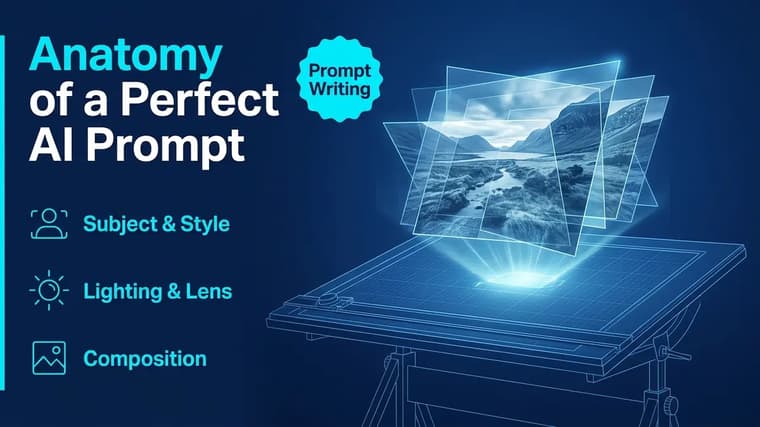
Strong prompts aren't written in one inspired burst — they're assembled from parts, and each part does a specific job. Once you can see those parts, you can diagnose any weak prompt in seconds and fix exactly the piece that's failing. This article dissects the anatomy of a complete prompt and builds one real example up, layer by layer, so you can watch each part earn its place.
Our running example starts as the weakest possible prompt: "a samurai." By the end it will be a prompt you'd actually publish.
Part 1: The Subject
The subject is who or what the image is about, and it belongs at the front of the prompt — models weight early words most heavily. The job here is precision: age, build, clothing, era, distinguishing details. Every attribute you skip is a decision the model makes without you.
Running example: "a samurai" becomes "an aging samurai with a gray-streaked topknot, wearing weathered dark-blue lacquered armor".
Already the image has a face. "Aging" sets the features, "gray-streaked topknot" the hair, "weathered dark-blue lacquered armor" the wardrobe and even hints at a history.
Part 2: Action and Pose
A subject with no action gets a default pose — usually a stiff, centered, camera-facing stance. Giving the subject something to do creates body language, gaze direction, and narrative. Verbs are underrated prompt material: kneeling, mid-stride, reaching, glancing over a shoulder, leaning into wind.
Running example adds: "kneeling in fresh snow, head bowed, both hands resting on the sheathed sword planted upright before him".
Now there's a story. The pose implies ritual, exhaustion, or mourning — and the model will echo that in the face and the framing.
Part 3: The Environment
The environment answers "where and when." Be concrete: a place, a time of day, weather, and one or two set-dressing details. Environments also feed the color palette — a bamboo forest pushes greens, a night market pushes warm neon.
Running example adds: "in a snow-covered temple courtyard at dawn, bare maple branches overhead, snow falling lightly".
Use drawable details
One vivid environmental detail beats five generic ones. "Bare maple branches overhead" does more than "beautiful detailed background scenery" ever will, because it's something the model can actually draw.
Part 4: Lighting
Lighting is where good prompts become striking ones. Name the source, the direction, and the quality: "low golden-hour sun from the left", "soft overcast light", "harsh single spotlight", "cool blue pre-dawn glow". If you specify nothing, you usually get flat, even, forgettable light.
Running example adds: "cold blue pre-dawn light, with a faint warm glow from temple lanterns behind him".
Notice this creates contrast — cool ambient light against warm lantern light. Two-source lighting descriptions like this are a reliable way to get depth and dimension.
Part 5: Camera and Framing
Camera language controls where the viewer stands. Distance (close-up, medium shot, wide shot), angle (low angle, eye level, overhead), and lens behavior (85mm portrait compression, wide-angle distortion, macro detail, shallow depth of field) are all levers the model understands well. Framing also decides which aspect ratio suits the image — see aspect ratios explained.
Running example adds: "medium wide shot from a low angle, shallow depth of field, snowflakes blurred in the foreground".
The low angle grants the subject dignity; the foreground snow adds a layer between viewer and subject, which instantly reads as intentional photography.
Part 6: Style
The style anchor tells the model what medium and tradition the image belongs to: "cinematic film still", "ink wash painting", "flat vector illustration", "35mm film photograph with grain". Without one, the model defaults to a generic middle ground. One committed style anchor outperforms several hedged ones — "photorealistic digital painting concept art style" is three styles fighting.
Running example adds: "cinematic film still".
Part 7: Mood
Mood is a one-or-two-word emotional instruction that quietly adjusts color grading, contrast, and expression: solemn, jubilant, eerie, tender, defiant. It's the cheapest part of the prompt — two words — and it ties all the other parts together.
Running example adds: "solemn, contemplative mood".
Part 8: Quality Modifiers (Use Sparingly)
The old habit of chaining "8k, ultra HD, masterpiece, best quality, trending" is mostly dead weight on current models. What still helps is naming concrete qualities: "sharp focus on the face", "fine fabric texture", "film grain". If a modifier doesn't describe something visible, cut it.
The Assembled Prompt
Here's every part clicked together in order — subject, action, environment, lighting, camera, style, mood, and one restrained quality note:
An aging samurai with a gray-streaked topknot, wearing weathered dark-blue lacquered armor, kneeling in fresh snow with head bowed, both hands resting on the sheathed sword planted upright before him, in a snow-covered temple courtyard at dawn, bare maple branches overhead, snow falling lightly, cold blue pre-dawn light with a faint warm glow from temple lanterns behind him, medium wide shot from a low angle, shallow depth of field with snowflakes blurred in the foreground, cinematic film still, solemn contemplative mood, sharp focus on the face
Compare that to "a samurai." Same subject, but now the model receives roughly a dozen deliberate decisions instead of making them all itself.
Use only what matters
You don't need all eight parts in every prompt. A quick concept sketch might only need subject, style, and mood. But when an image matters, run down the list and check that every part you skipped was skipped on purpose — not forgotten.
Using the Anatomy to Debug Prompts
The real payoff of this framework is diagnosis. When a generation disappoints, ask which part failed:
- Wrong person or object? Sharpen the subject.
- Stiff and posed? Add action.
- Boring backdrop? Rebuild the environment.
- Flat and lifeless? The lighting slot is empty.
- Awkward framing? Add camera language.
- Generic look? Commit to a style anchor.
Fix one slot, regenerate, repeat. And when you want a shortcut, study prompts that already work — every post on the explore page shows a finished image beside its full prompt, and you can trace this same anatomy through the ChatGPT prompts collection. For unwanted elements that keep sneaking in despite a solid prompt, negative prompts explained covers the other half of the toolkit.
Frequently Asked Questions
❖Does the order of the parts matter?
Subject-first matters most — early words get the most weight. After that, the order above (action, environment, lighting, camera, style, mood) is a sensible default because it moves from content to presentation, but models tolerate reshuffling of the middle parts well.
❖Is an eight-part prompt too long for some tools?
No. Assembled carefully, all eight parts fit in 70-90 words, which every major generator handles comfortably. Length becomes a problem when parts repeat themselves or contradict each other, not when each phrase adds a new decision.
❖Should I write prompts as full sentences or comma-separated phrases?
Both work. Conversational tools like ChatGPT and Gemini are happy with flowing sentences; Midjourney convention favors comma-separated fragments. The anatomy is identical either way — only the punctuation changes.
❖What if two parts conflict, like "soft overcast light" and "harsh dramatic shadows"?
The model will average them into something muddy, or pick one at random. Contradictions are the most common hidden prompt bug. When you get inconsistent results across regenerations, read your prompt looking specifically for two phrases pulling in opposite directions.