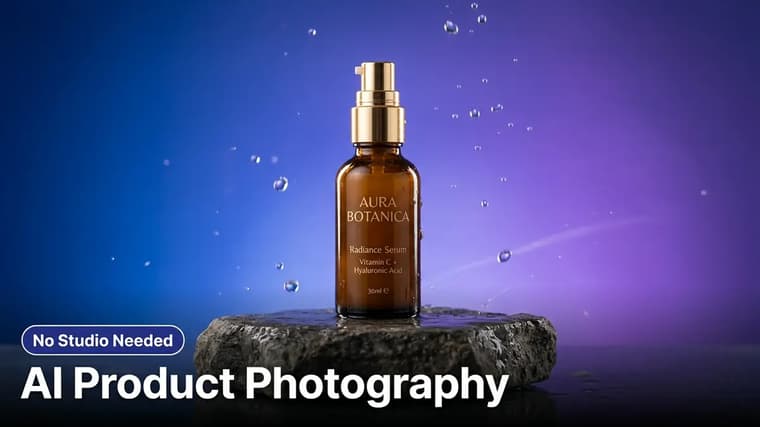
Professional product photography used to mean hiring a studio or buying lightboxes, backdrops, and a real camera. Now a small seller can photograph a product on a kitchen table, hand the image to Gemini or ChatGPT, and get back a marble-countertop hero shot with softbox lighting — as long as the AI is told, firmly, to leave the product itself untouched. This guide covers the full workflow, from clean source photo to the verification pass every image needs before it goes on a live listing.
Step 1: Photograph the Product Cleanly
The AI will replace your background and lighting, but it can only preserve product details it can actually see. Five minutes of care here saves an hour of failed generations:
- Shoot near a window in indirect daylight. Even, soft light shows the product's true colors and materials.
- Use a plain, contrasting surface — white paper for dark products, a dark matte surface for light ones.
- Wipe the product. Dust and fingerprints get faithfully preserved or, worse, weirdly reinterpreted.
- Fill the frame, keep the whole product inside it, and shoot at the angle you want in the final image. AI changes environments convincingly; rotating a product to a new angle is where labels and proportions start to warp.
- Take several angles now: straight-on, three-quarter, top-down, and a label close-up. You will want them for a full listing set.
Control reflections
If your product is reflective — glass, polished metal, glossy plastic — photograph it with a plain white wall or sheet behind the camera. Whatever is reflected in the surface will survive into the generation, and a cluttered kitchen reflected in a perfume bottle ruins an otherwise perfect shot.
Step 2: Learn the Backdrop Vocabulary
Backgrounds sell the shot. These are the reliable families, with the descriptive language that produces them:
- Marble and stone: "on a white Carrara marble surface with soft gray veining" or "on a dark slate slab." Classic for cosmetics, candles, and food.
- Seamless gradient: "on a seamless studio backdrop fading from light gray to white" for a clean catalog look, or a brand-color gradient for hero banners.
- Textural minimal: "on warm oak wood with soft morning light" or "on natural linen fabric" for handmade and organic products.
- Lifestyle scenes: "on a bathroom shelf beside a folded white towel and a small green plant" or "on a cafe table next to a latte, blurred window light behind." These show context and scale.
- Elevated props: "on a round stone pedestal with a soft shadow" for a premium, editorial feel.
Keep scene descriptions short and put the product first. A prompt that spends four sentences on the imaginary bathroom gives the model permission to treat your product as a minor prop in its scene.
Step 3: Speak Lighting Like a Studio Photographer
Lighting words are the difference between "phone photo on a new background" and "studio shot." The vocabulary that works:
- "Soft diffused softbox lighting from the upper left" — the standard flattering studio setup, gentle shadows.
- "Subtle rim light outlining the product's right edge" — separates the product from darker backgrounds; excellent for bottles and electronics.
- "Soft natural window light from the side with gentle falloff" — the lifestyle look.
- "Realistic soft contact shadow beneath the product" — the detail most fakes miss; a product with no grounded shadow looks pasted on.
- "Gentle reflection on the glossy surface below" — for marble and acrylic surfaces, adds instant production value.
Ground the product
Always specify the shadow. Ungrounded products floating a millimeter above their surface are the single most common giveaway of an AI composite. One sentence — "with a realistic soft shadow grounding the product on the surface" — fixes it almost every time.
Step 4: Protect the Product Itself
This is the non-negotiable part for a seller. AI models regenerate everything by default, and "everything" includes your label typography, logo, cap shape, and stitching. Your prompt must ring-fence the product explicitly: identical shape, proportions, colors, and — most fragile of all — identical label text.
Take the product in this photo and place it in a professional studio product shot. Critical: the product itself must remain exactly identical to the photo — same shape, same proportions, same colors and materials, and the label must be perfectly preserved with the exact same text, font, and logo, completely readable and unaltered. Do not redesign, straighten, or "improve" the product in any way. New scene: place it on a white Carrara marble surface with soft gray veining, a softly blurred warm beige background behind it. Lighting: soft diffused softbox light from the upper left, a subtle rim light on the right edge, and a realistic soft contact shadow grounding the product on the marble. Composition: product centered, shot at the same angle as the original photo, generous clean space around it suitable for an e-commerce listing. Photorealistic commercial product photography, sharp focus on the product.
Swap the scene and lighting lines freely; keep the first half of the prompt intact in every variation. For a deeper look at why working from your real photo beats describing a product from scratch, see reference images vs text prompts.
Read every label
Small text is where generations fail silently. A label that says "Lavender Body Butter, 200ml" can come back as "Lavendar Bodv Buttor" in a font that is almost — but not quite — yours. Zoom to full size and read every word of every generated label, every time. If the text keeps breaking, generate the scene with the label facing slightly away, or fix the label region by asking the model to restore it exactly from the original.
Step 5: Build Lifestyle Mockups for the Full Listing
A strong listing mixes a clean hero shot with two or three context images. Reuse the same protected-product prompt structure and change only the scene:
- In-use context: "held in a hand with natural skin texture, blurred kitchen background" — check the hand carefully, fingers remain an AI weak point.
- Scale reference: place the product next to familiar objects like a coffee cup so buyers can judge size honestly.
- Seasonal variants: the same hero shot on an autumn-toned or festive backdrop, without reshooting anything.
Keep the product angle consistent across the set so the listing feels like one photo session. Generate each image fresh from the original photo — editing an already-generated image degrades quality generation over generation.
Real product shoot
A candle seller's typical session: one window-light photo of the candle, then four generations — white marble hero, dark slate moody variant, bathroom-shelf lifestyle scene, and a hand-held close-up. Three of four were usable on the first try; the lifestyle scene needed one follow-up to fix a warped wick. Total time under twenty minutes.
Before You Publish: The Listing Checklist
Run every AI product image through this list before it touches a live listing:
- Label text reads perfectly at full zoom — every word, every number.
- Shape and proportions match the physical product side by side.
- Colors are honest. If the AI made your terracotta pot more vivid than reality, correct it — buyers compare the delivered item to the photo, and mismatches drive returns.
- Shadow and reflections are physically plausible.
- No invented extras: the AI sometimes adds a second product, a garnish, or accessories a buyer might assume are included.
- Marketplace compliance: some platforms require a pure white main-image background and have policies on AI-generated imagery — check your marketplace's current rules.
The honest-representation point is the one that matters most: AI should upgrade the photography around your product, never the product itself. Ownership and disclosure questions for commercial AI imagery are evolving too — who owns AI-generated images covers where things stand.
Ready to shoot? Find copy-ready product photography prompts on the explore page, or start from the Gemini prompts collection and swap in your own scene and lighting lines.
Frequently Asked Questions
❖Can AI product photos really replace a studio for a small shop?
For standard catalog shots, lifestyle context images, and seasonal variants — yes, convincingly. A studio still wins for complex reflective products shot at many angles, very large items, and campaigns where a single hero image justifies real production budget.
❖How do I stop the AI from changing my label?
Three layers: state "label perfectly preserved with the exact same text, font, and logo" in the prompt, keep the product at the same angle as your source photo, and verify at full zoom after every generation. If a label still breaks repeatedly, compose the shot so the label faces slightly away from the camera.
❖Which tool is best for product photography edits?
Gemini and ChatGPT both handle background replacement and relighting well from an uploaded photo, and both let you iterate conversationally, which matters for label fixes. Try your product in each; results vary by material and label complexity more than by tool.
❖Is it allowed to use AI-generated images in marketplace listings?
Policies vary by platform and change frequently. The consistent baseline everywhere: the image must honestly represent the physical product a buyer receives. Enhanced backgrounds are broadly accepted; altered products are misrepresentation regardless of the tool used.