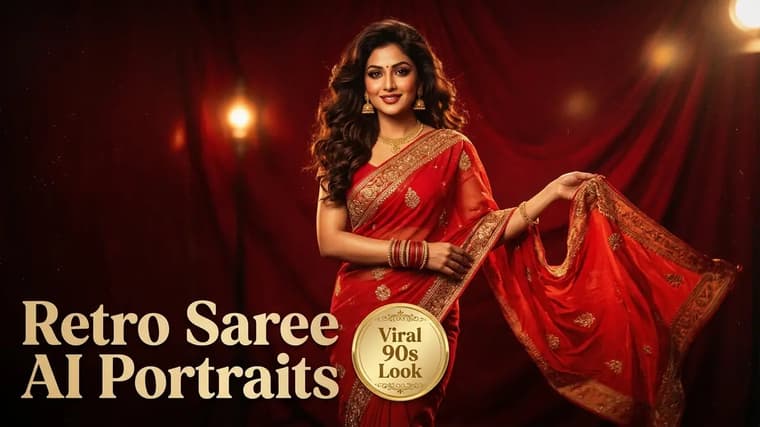
The retro saree portrait is the trend that filled feeds with images that look like stills from a 90s Bollywood film: a flowing chiffon saree, golden evening light, wind in the hair, film grain, and a gaze straight out of a movie poster. It works because it combines three things AI editing is genuinely good at — outfit transformation, cinematic lighting, and vintage texture — into one look. This guide gives you the complete workflow with a ready-to-paste prompt, the customizations people actually ask for, and fixes for the runs where the face or the drape goes wrong.
What Makes the Look Work
Study a few good examples on the explore page and you will notice the same ingredients every time:
- The saree: almost always chiffon or georgette — fabrics that catch wind and light — in a deep saturated color like red, mustard, or emerald.
- The light: golden hour or a warm studio key light, low and directional, with soft shadows and a glow on the hair.
- The texture: visible film grain, slightly faded blacks, warm color cast — the fingerprint of 90s celluloid.
- The styling: soft curls or a loose braid, flowers (usually jasmine/gajra) in the hair, minimal retro jewelry, subtle winged eyeliner.
- The mood: a poster-like composition — subject off-center, dramatic sky or old architecture behind, dupatta or pallu caught mid-breeze.
Your prompt needs to hit all five. Miss the grain and it looks like a modern photo in old clothes; miss the lighting and it looks like a costume tried on under tube light.
Step 1: Pick the Selfie and the Tool
This is a photo-edit trend, so it starts with an upload. Gemini is the most popular tool for it and handles the saree drape and identity preservation well; ChatGPT with an uploaded photo also produces strong versions. Selfie checklist:
- Sharp and well-lit, face fully visible, front-facing or a gentle three-quarter angle.
- Hair visible (the styling transformation reads better).
- No sunglasses, caps, or heavy filters.
- One person in frame.
A waist-up photo gives the model more to work with for posture and drape than a tight face crop.
Step 2: Run the Full Worked Prompt
Attach your photo and paste this complete prompt in the same message.
Transform this uploaded photo of me into a 1990s Bollywood-style cinematic portrait. Keep my face 100% identical to the uploaded photo — do not change my facial features, skin tone, or face shape. Dress me in a deep red chiffon saree with a thin gold border, draped elegantly, with the pallu flowing in a gentle breeze. Style my hair in soft retro curls with a string of white jasmine flowers pinned on one side, small gold jhumka earrings, subtle winged eyeliner and a small bindi. Setting: golden hour, standing on an old rooftop terrace with warm evening sky behind me. Dramatic low-angle golden sunlight from one side, soft lens glow, visible 35mm film grain, slightly faded warm retro color grade like a 90s film still. Cinematic movie-poster composition, realistic photograph.
Run it unchanged first to get a baseline. Notice how the prompt is doing five separate jobs — identity, outfit, styling, setting, and film treatment — each in its own sentence. That separation is what makes it easy to customize later without breaking the rest, a structure explained more generally in how to write better AI image prompts.
Step 3: Lock the Identity
The line "keep my face 100% identical to the uploaded photo" is the most important sentence in the prompt. This trend involves heavy restyling — makeup, hair, era — which gives the model maximum temptation to redraw the face into a generic film heroine. Rules:
- Keep the identity sentence early in the prompt and blunt in wording.
- Ask for makeup as an addition, not a transformation: "subtle winged eyeliner" is safe; "glamorous makeover" invites a new face.
- If drift persists, add a second lock at the end: "The person must be clearly recognizable as the same person in the uploaded photo."
Avoid celebrity phrasing
"Make me look like a 90s actress" is the single most face-destroying phrase in this trend. It tells the model to replace you with its idea of an actress. Describe the styling elements instead — the saree, the curls, the eyeliner — and let the era emerge from the details while your face stays yours.
Step 4: Customize the Saree, Backdrop, and Era
Once the baseline works, change one element per run.
Saree color and fabric. Swap "deep red chiffon" for: mustard yellow chiffon (the most iconic retro choice), emerald green georgette, royal blue with silver border, black chiffon with a thin gold edge, or soft pastel pink for a gentler look. Keep the fabric word — chiffon or georgette — because the flowing drape depends on it; a heavy silk kanjeevaram drapes stiffly and changes the whole silhouette (beautiful, but a different trend).
Backdrop. Rooftop terrace at sunset is the classic. Strong alternatives: a mustard field with a hazy horizon, an old haveli courtyard with carved arches, a rain-soaked street at dusk with warm lamps, a vintage film-studio set with a painted sky backdrop.
Era dial. For a 70s feel: bouffant-influenced hair, bolder winged liner, more saturated colors. For the 90s: soft curls, chiffon in wind, golden haze. For a 60s black-and-white version: "black and white film still, soft studio key light, deep film grain" — and drop the color words entirely.
Change one thing
One-line follow-ups that work well after a good first result: "Same image, but change the saree to mustard yellow chiffon." Then: "Now make the backdrop a mustard field at golden hour." Changing one variable per reply keeps the face and mood stable while you explore.
Cultural Styling Variations
The core recipe adapts across regional styles, and small authentic details make the portrait feel intentional rather than generic:
- South Indian: rich silk kanjeevaram in gold and maroon, jasmine gajra around a low bun, temple jewelry, a larger round bindi.
- Bengali: white saree with a broad red border, hair in a loose bun, red bindi — instantly reads as classic Bengali styling.
- Marathi: nauvari-style drape, nath (nose ring), green glass bangles.
- Punjabi retro: swap the saree for a chiffon salwar-kameez with a flowing dupatta and keep every lighting and grain line the same.
Name the specific garments and jewelry in your prompt — the model knows terms like gajra, jhumka, and kanjeevaram, and using them beats describing them vaguely.
Retro style for men
Men can run this trend too: swap the saree lines for "a cream silk kurta with a dark bandhgala jacket" or "a retro 90s hero look with a leather jacket and windswept hair", and keep the entire lighting, grain, and composition block unchanged. The cinematic treatment is what makes the image, not the specific garment.
Common Failures and Fixes
The face drifted. Strengthen the identity lock, use a sharper selfie, and avoid stacked edits — after two or three follow-ups, restart with the original photo and one combined prompt. This photocopy-degradation effect and its fixes are covered in consistent characters in AI images.
The drape looks wrong. Pallus over the wrong shoulder or physics-defying fabric usually respond to simpler instructions: "draped elegantly in the classic style, pallu over the left shoulder." If one run is stubborn, regenerate — drape quality varies between attempts.
It looks modern, not retro. The film treatment sentence got diluted. Make sure "visible 35mm film grain, slightly faded warm retro color grade" survives your edits, and add "no modern sharpness, soft vintage focus" if needed.
The lighting is flat. Reassert direction: "strong golden sunlight from the left side, face partly in soft shadow." Directional light is what separates a poster from a passport photo.
For ready-tested versions of this trend with example images, browse the Gemini prompts collection — and if portraits are your thing generally, the AI headshots guide applies the same identity-preservation craft to professional photos.
Frequently Asked Questions
❖Which tool is best for retro saree portraits?
Gemini with an uploaded selfie is the community favorite for this trend and handles fabric and faces well. ChatGPT produces strong versions too. The prompt in this guide works in both.
❖Why does my saree color come out different from what I asked?
Strong golden-hour lighting shifts colors warm — a royal blue can drift teal under a heavy orange grade. Either accept the cinematic cast, or specify "keep the saree true deep blue even under the warm light."
❖Can I do this with an old or low-quality photo?
You can try, but likeness suffers — the model invents whatever detail the photo lacks. A quick new selfie near a window will beat a treasured but blurry old photo every time. For preserving actual old photos, restoration is a separate workflow from restyling.
❖Is one generation enough, or should I expect to iterate?
Expect two to four runs: one baseline, one or two single-variable tweaks (saree color, backdrop), and occasionally a restart if the face drifts. Budget ten minutes and you will land the shot.