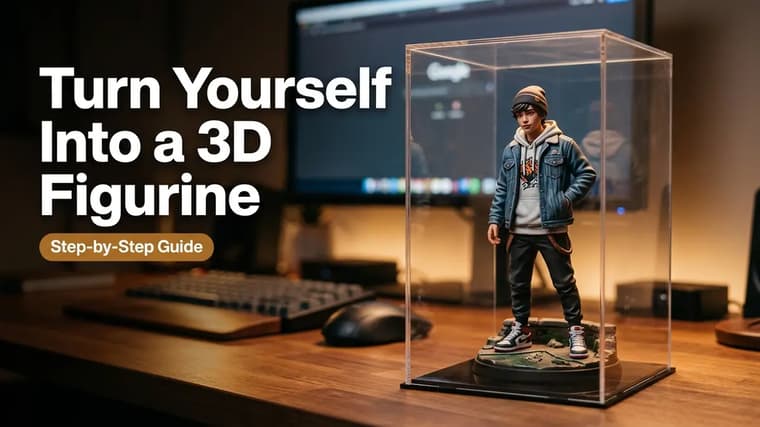
The 3D figurine trend is the most shared AI photo format of the past year for a simple reason: seeing yourself as a boxed collectible action figure — complete with packaging, accessories, and a designer desk behind it — is instantly funny and instantly personal. The good news is that it is also one of the easier trends to pull off, because the whole look is driven by one well-structured prompt. This guide gives you the exact workflow, a complete worked prompt, and fixes for the two failures everyone hits: the face that stops looking like you, and the proportions that come out wrong.
What the Trend Actually Looks Like
Before prompting, know the target. The classic result contains four elements:
- The figurine of you — a stylized 1/7-scale collectible with your face, usually standing on a small round base, rendered in glossy PVC-toy style.
- The packaging box — behind or beside the figure, designed like real collectible packaging: your name as the product title, character artwork, a clear plastic display window.
- The scene — typically a computer desk with a monitor showing the 3D modeling software used to "design" the figure, which sells the behind-the-scenes joke.
- Realistic photography — the image looks like a product photo of a real toy, with soft studio light and shallow depth of field, not like a cartoon.
There is a popular desk-designer version and a cleaner store-shelf version. Start with the desk version — it is the recognizable one — then branch out.
Step 1: Choose Your Tool and Your Selfie
Two tools handle this trend well. Gemini with an uploaded selfie is the go-to: it is strong at keeping a real face recognizable while completely restyling the body into toy form. ChatGPT also does it well with an uploaded photo and tends to produce especially clean packaging design. If you have both, run the same prompt in each and keep the better face.
The selfie requirements are strict for this trend because your face is being shrunk onto a small figure:
- Sharp, well-lit, front-facing, full face visible.
- No sunglasses, no heavy filters, no motion blur.
- Head and shoulders or waist-up framing works best.
- One person only.
Use a full-body photo
A full-body photo helps if you want the figurine's outfit and body type to match yours. With only a headshot, the model invents the body — fine if you are describing a costume anyway, worse if you want "me, as I am, but as a toy."
Step 2: Run the Full Worked Prompt
Attach your photo and paste the complete prompt in the same message. Here is a full version of the classic desk scene.
Using the uploaded photo, create a realistic photo of a 1/7 scale collectible figurine of this exact person, keeping the face 100% identical to the photo. The figurine stands on a small round transparent acrylic base on a modern computer desk. Behind it, a collectible toy box with a clear plastic window, featuring stylized character artwork of the same person and the product name in bold letters. Next to the figurine, a computer monitor displays the 3D sculpting software with the figure's wireframe model on screen. Glossy PVC toy texture on the figurine, realistic studio product photography, soft warm lighting, shallow depth of field, sharp focus on the figurine.
Send it exactly as written first. Get a baseline before you customize — if the baseline works, every later problem is traceable to one of your edits. This copy-first, tweak-second habit is the core method we teach in how to use prompts from PromptMatrix.
Step 3: Customize the Box Design
The packaging is where the trend gets personal, and it is fully promptable. Swap or add lines like:
- Product name: the box title text reads "YOUR NAME" in bold letters — put the actual name in quotes so it renders as literal text.
- Series branding: "limited edition" badge, a series name like "Office Legends" or "Gym Rat Collection", a fake barcode.
- Colorway: "matte black box with gold accents" or "pastel pink box with holographic foil."
- Accessories in the box: small molded extras beside the figure — a tiny laptop, a coffee cup, a cricket bat, swappable hands. Two or three accessories that describe your life make the image feel bespoke.
- Outfit: dress the figurine as anything — astronaut suit, wedding outfit, your actual work uniform.
Change one or two elements per run. Box text is the most fragile part: keep names short, put them in quotation marks, and if the text comes out garbled, reply asking for the same image with the text corrected.
Packaging tweak
A follow-up that works well: "Same image, but the box is deep blue with silver foil accents, the title text reads 'RAVI' in bold white letters, and add a tiny molded coffee mug and headphones as accessories inside the packaging window."
Common Failure 1: Face Drift
You generate the figurine and it is brilliant — except the face is a handsome stranger. This is the number one failure, and it has three causes and three fixes:
- Missing identity lock. The prompt must explicitly say "keep the face 100% identical to the uploaded photo." Without it, the model happily invents a toy-generic face. If drift persists, strengthen it: "the face must be an exact match to the uploaded photo — do not change facial features, skin tone, or face shape."
- Weak source photo. Blurry, angled, or filtered selfies force the model to fill gaps. Re-run with your sharpest front-facing shot.
- Stacked edits. Every follow-up regenerates from the previous output, and faces degrade like photocopies. After two or three revisions, restart: fresh chat, original photo, one combined prompt with all your accumulated changes.
There is also a legitimate stylization question — a toy face is not a photo face. If you want a more literal likeness, add "realistic facial likeness, minimal stylization"; for a cuter look, allow "slightly stylized chibi proportions" and accept a looser match. The techniques in consistent characters in AI images apply directly here.
Common Failure 2: Wrong Proportions and Scale
The second classic failure: the "figurine" comes out life-sized, or looks like a regular photo of you standing on a desk, or the box is toy-sized while you are human-sized. Fixes:
- Anchor the scale in numbers and objects. "1/7 scale" plus surrounding desk objects (keyboard, monitor, mug) gives the model real-world size references. A figurine next to a keyboard reads as small; a figure alone on a void does not.
- Say it is a toy, twice. "Collectible figurine" in the first sentence and "glossy PVC toy texture" later — material words do heavy lifting. Skin that looks like plastic is what makes the brain read "toy."
- Keep the base. The round acrylic base is not decoration; it is the strongest single visual cue that this is a display figure.
Keep the scene anchor
Do not delete the monitor-with-3D-software line to simplify the prompt. It seems optional, but it anchors both the scale and the story of the scene. If you want a cleaner image, replace it with another anchor — "displayed on a collector's shelf beside other boxed figures" — rather than removing context entirely.
Going Further
Once the classic version works, variations are one prompt-line away: a store shelf full of different versions of you, a blister-pack action figure in retro 90s packaging, a garage kit on a workbench with paint bottles. Browse the explore page for figurine prompts with example images, check the Gemini prompts collection for tested photo-edit versions, and see AI photo trends 2026 for where this format is heading next.
Frequently Asked Questions
❖Which tool gives the best figurine results?
Gemini with an uploaded selfie is the most reliable for face likeness; ChatGPT often designs nicer packaging. The prompt in this guide works in both — run it in whichever you have, and if you have both, compare.
❖Why does the text on my box come out misspelled?
Rendered text is the weakest part of image models. Keep box text to one short word in quotation marks, and fix errors with a follow-up: "same image, but the box text must read exactly 'ARJUN'." One correction round usually lands it.
❖Can I make a figurine of someone else, like a friend or partner?
With their permission, yes — the workflow is identical. Couple figurines in one box are popular; ask for "two figurines of the two people in the uploaded photo, boxed together as a set" and keep the identity lock for both faces.
❖My result looks like a cartoon, not a real toy photo. What went wrong?
You are missing the photography language. Make sure the prompt ends with "realistic studio product photography, soft lighting, shallow depth of field" — that line is what turns a 3D illustration into what looks like a photo of a physical object.